
Dux-Soup Review: Complete Breakdown of Features, Pricing & Real User Insights in 2026

Dux-Soup Review
Complete Breakdown of Features, Pricing & Real User Insights in 2026

If you’re looking for a smarter way to automate LinkedIn outreach and generate consistent leads, Dux-Soup is one of the most widely discussed tools in 2026. Known for its Chrome extension and automation capabilities, it helps users streamline prospecting, save time, and scale their LinkedIn campaigns without relying on manual effort. However, with increasing concerns around LinkedIn limits, account safety, and mixed feedback across platforms like G2, Trustpilot, and Capterra, many users question whether it truly delivers on its promises. You can explore its features in detail through the official Dux-Soup platform.
In this detailed Dux-Soup Review, we will cover everything you need to know, including its features, pricing, real user insights, advantages, limitations, and whether it is the right fit for your LinkedIn automation strategy. Whether you are a marketer, recruiter, or agency owner, this guide will help you make an informed decision in 2026.
What is Dux-Soup?
Dux-Soup is a powerful Chrome extension built to automate LinkedIn lead generation and outreach. It helps users perform actions like visiting profiles, sending connection requests, and follow-up messages automatically, saving hours of manual effort. Instead of spending time on repetitive tasks, Dux-Soup for LinkedIn automation allows you to focus on building relationships while the tool handles the heavy lifting in the background. You can explore its features directly through this official Dux-Soup platform.
The tool is ideal for marketers, recruiters, sales professionals, and agencies who rely on LinkedIn for business growth. By automating prospecting and engagement, it solves the major problem of slow and inconsistent lead generation, making it easier to scale outreach campaigns efficiently and consistently.
Dux-Soup Review 2026 – Quick Overview
Here’s a quick snapshot of Dux-Soup to help you understand its core offering and whether it fits your needs. This summary is based on multiple sources, including Dux-Soup Reviews 2026 – G2 and general Dux soup G2 insights.
| Feature | Details |
|---|---|
| Tool Type | LinkedIn Automation Chrome Extension |
| Best For | Marketers, recruiters, sales teams, and lead generation agencies |
| Starting Price | Around $11.25/month (Pro plan, billed annually) |
| Free Trial | Yes (limited free version available) |
| Risk Level | Medium (depends on usage; automation may trigger LinkedIn restrictions) |
This overview highlights that Dux-Soup is primarily designed for LinkedIn automation and scalable outreach, but like most automation tools, it comes with some level of risk if not used carefully.
Dux-Soup Review (Trustpilot Ratings & User Feedback)
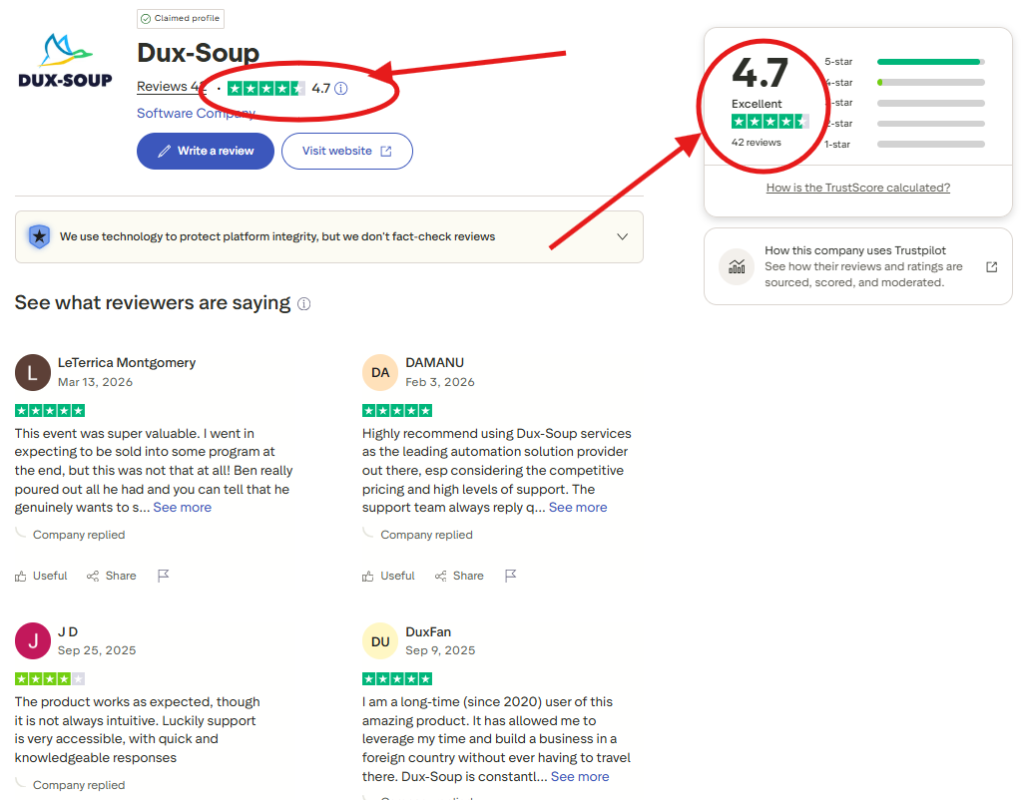
Based on the Trustpilot screenshot, Dux-Soup holds an impressive rating of 4.7/5 from 40+ reviews, which reflects a very high level of user satisfaction. Most reviewers describe the tool as effective, reliable, and valuable for LinkedIn automation, especially when it comes to saving time and generating leads. Users frequently highlight that Dux-Soup helps them build connections, grow their business, and streamline outreach efforts, with some long-term users even mentioning consistent results over several years.
Additionally, Trustpilot feedback shows that users appreciate the responsive customer support and competitive pricing, which makes the platform more accessible compared to other automation tools. However, a few users noted that the interface may not always feel intuitive at first, though this is often balanced by helpful support and documentation. Overall, Trustpilot reviews strongly position Dux-Soup as a trusted and high-performing LinkedIn automation tool. If you want to try it, you can use the exclusive coupon code “BAAGUL10” and 👉 start using Dux-Soup here.
Dux-Soup Review (Chrome Web Store Ratings & Performance)
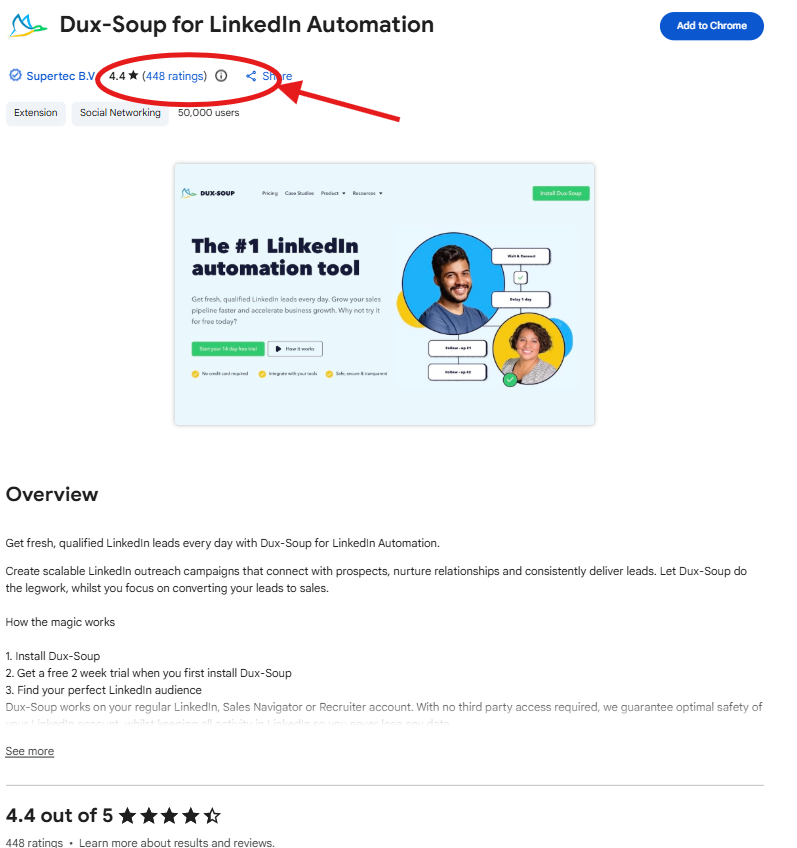
Based on the Chrome Web Store screenshot, Dux-Soup holds a strong rating of 4.4/5 from 400+ users, which reflects consistent performance and reliability among a large user base. This rating is particularly important because it comes directly from active users who regularly use the extension for LinkedIn automation. The tool is clearly among professionals looking to generate leads, automate outreach, and scale LinkedIn activities efficiently, with many users appreciating its smooth functionality and time-saving capabilities.
The listing also highlights that Dux-Soup is used by 50,000+ users, further proving its popularity and trust in the market. Users benefit from features like automated connection requests, follow-ups, and campaign management directly within LinkedIn. Overall, the Chrome Web Store data confirms that Dux-Soup is a widely adopted and effective automation tool with strong user satisfaction. If you want to try it, you can use the exclusive coupon code “BAAGUL10” and start using Dux-Soup here.
Dux-Soup Review (Reddit User Discussion & Safety Insights)
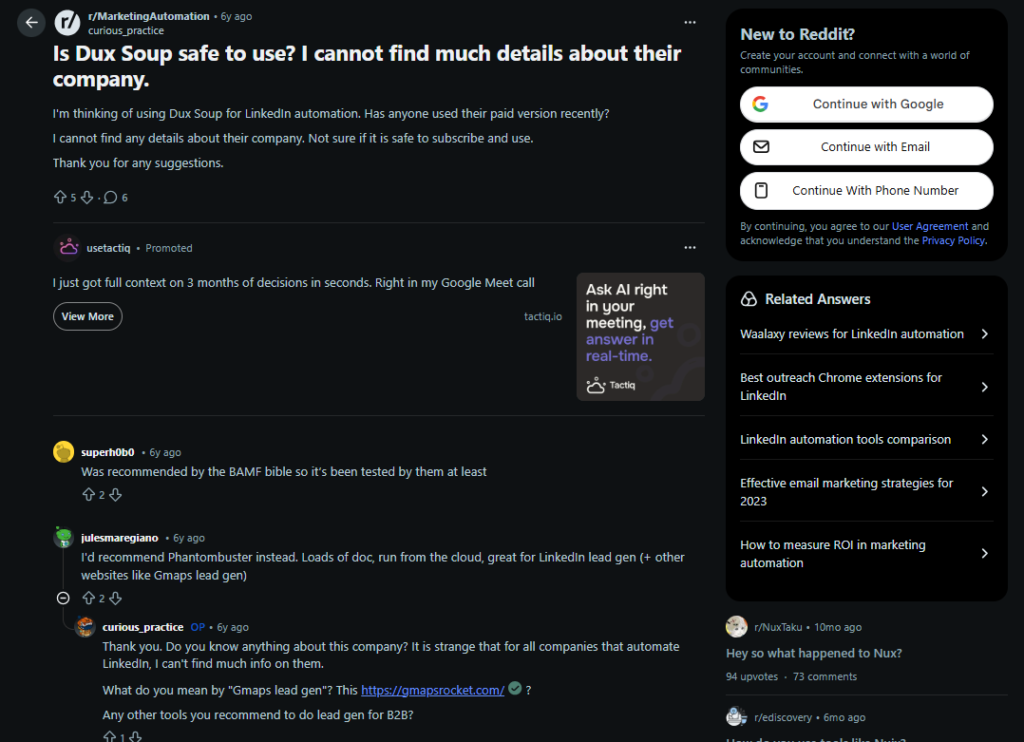
The Reddit discussion in the screenshot highlights a common concern among users asking whether Dux-Soup is safe to use, especially due to limited public information about the company. Some users mention that the tool has been recommended by well-known marketing communities, which adds a level of credibility, while others suggest alternatives like Phantombuster—showing that users often compare multiple tools before deciding. Overall, the conversation reflects curiosity and caution rather than strong negative feedback.
This suggests that while Dux-Soup may not have complete transparency, it is still actively used and discussed within the marketing and lead generation space. Like any LinkedIn automation tool, its safety depends on proper usage and staying within platform limits. If you want to try it, you can use the exclusive coupon code “BAAGUL10” and start using Dux-Soup here.
Dux-Soup Review (Capterra Ratings & User Experience)
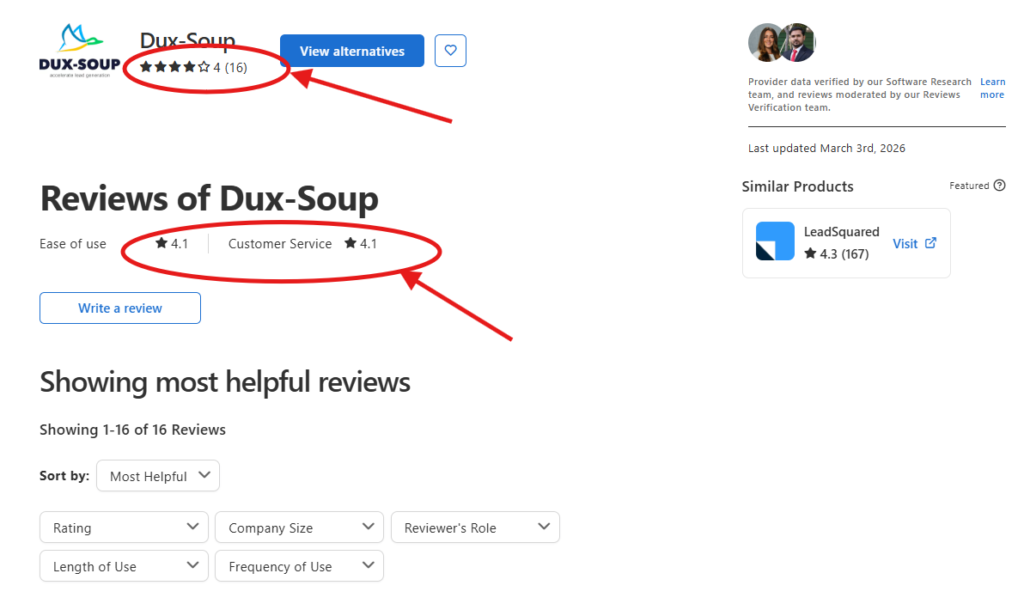
Based on the Capterra screenshot, Dux-Soup has an overall rating of around 4.0/5 from 15+ reviews, showing a generally positive but slightly mixed user experience. The platform scores 4.1 for ease of use and 4.1 for customer service, which indicates that most users find it fairly simple to operate and supported well enough during usage.
User feedback on Capterra highlights that Dux-Soup is effective for LinkedIn automation and lead generation, especially for automating repetitive tasks like connection requests and follow-ups. Many users appreciate its time-saving features and reasonable pricing, though some reviews mention occasional issues like performance lag, browser dependency, or inconsistent support experiences. Overall, Capterra positions Dux-Soup as a reliable mid-level automation tool with good usability but some technical limitations. If you want to try it, you can use the exclusive coupon code “BAAGUL10” and start using Dux-Soup here.
Dux-Soup Review (Based on G2 User Ratings & Feedback)
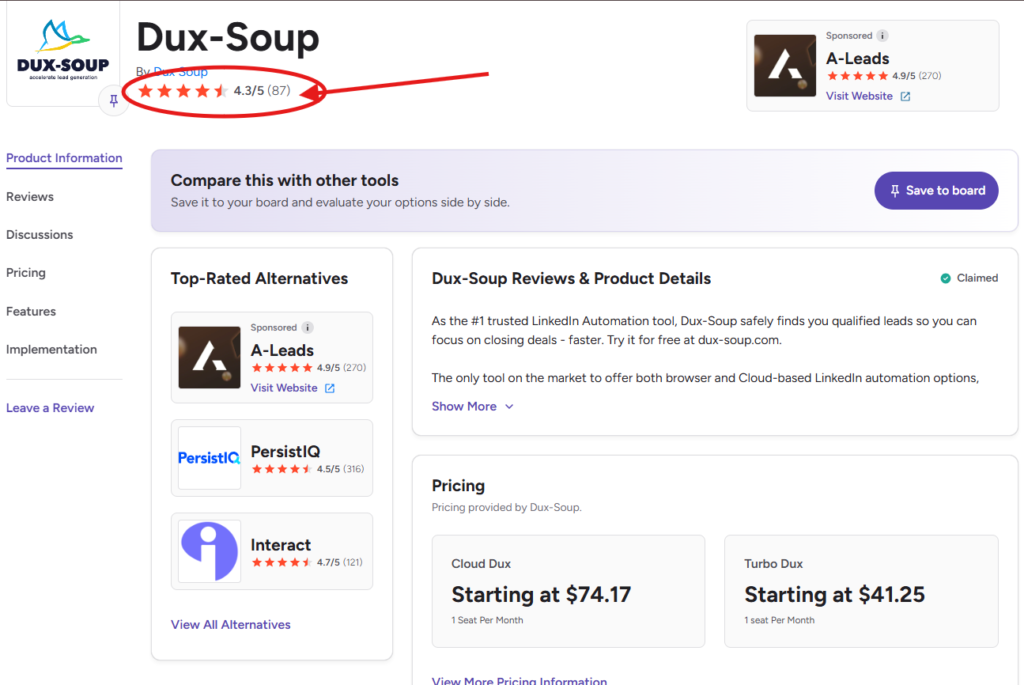
Based on the G2 screenshot, Dux-Soup has a strong rating of 4.3/5 from 80+ verified users, indicating high user satisfaction among marketers and sales professionals. Most users appreciate its ability to automate LinkedIn outreach, including connection requests, messages, and follow-ups, which helps save significant time and improve lead generation. It’s widely seen as a powerful tool for scaling LinkedIn prospecting, although some users mention a slight learning curve and minor limitations in campaign editing and integrations.
In terms of pricing, Dux-Soup offers plans like Turbo Dux starting at around $41/month and Cloud Dux at $74/month, making it a solid mid-range option for individuals and agencies. Overall, it is considered a reliable and results-driven LinkedIn automation tool. If you want to try it, you can use the exclusive coupon code “BAAGUL10” and get started with Dux-Soup here.
How To Use Dux Soup Coupon Code to Get 10% Off on All Subscription Plans (Step-by-Step Guide)
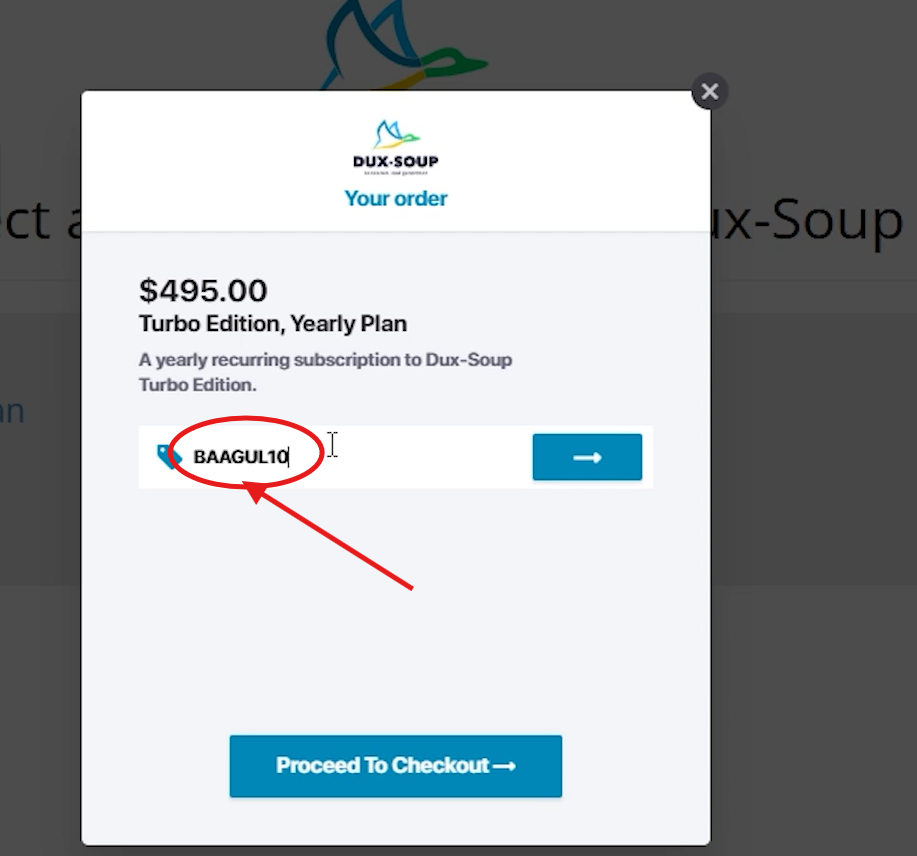
Using the Dux-soup Coupon Code “BAAGUL10” is simple and takes just a few minutes. Follow these steps to claim your discount on Dux-Soup:
Step 1: Visit the official Dux-Soup website using this exclusive discount link to ensure the offer is applied correctly.
Step 2: Sign up for a new account or access your existing account through the dux-soup login option.
Step 3: Choose a subscription plan that fits your needs, such as Dux-Soup Pro or other available plans.
Step 4: During checkout, enter the coupon code “BAAGUL10” in the promo code field.
Step 5: Click apply, and your 10% discount will be instantly reflected in the final price before payment.
Note: Pricing, discounts, and offers may change over time. It is recommended to verify the final discount at checkout, as availability and terms of the coupon may vary.
Key Features of Dux-Soup
LinkedIn Automation Tools
Dux-Soup offers powerful automation capabilities that simplify daily LinkedIn tasks. With Dux-Soup for LinkedIn Automation, users can automatically visit profiles, send connection requests, and initiate personalized messages at scale. This helps maintain consistent outreach without spending hours manually engaging with prospects, making it a valuable tool for lead generation and networking.
Drip Campaign & Messaging
One of the standout features is its drip campaign system, which allows users to send automated follow-up messages based on predefined sequences. This ensures that leads are nurtured over time without manual intervention. You can schedule messages, create multi-step campaigns, and maintain ongoing communication with prospects, improving response rates and conversions.
CRM Integration
Dux-Soup integrates with popular CRM tools like HubSpot and Salesforce, allowing seamless data synchronization. This means all your LinkedIn leads and conversations can be automatically stored and managed within your CRM, helping you track performance, manage pipelines, and streamline your sales workflow.
Cloud Automation
With cloud-based automation, Dux-Soup enables campaigns to run 24/7 without requiring your browser to stay open. This feature is especially useful for agencies and professionals managing large-scale outreach, as it ensures continuous prospecting and engagement even when you are offline.
Dux-Soup Chrome Extension
The Dux-Soup Chrome extension is the core of the tool and is designed for ease of use. Once installed, it works directly within LinkedIn, allowing you to control automation with simple settings and dashboards. Its user-friendly interface makes it accessible even for beginners, while still offering advanced options for experienced users looking to scale their automation efforts.
Dux-Soup Pricing Plans (2026)
When it comes to Dux-Soup pricing, the platform offers flexible plans designed for individuals, professionals, and agencies. Dux-Soup mainly provides three core plans: Pro, Turbo, and Cloud, each with increasing levels of automation and scalability.
| Plan | Best For | Key Features |
|---|---|---|
| Dux-Soup Pro | Beginners & individual users | Basic LinkedIn automation, auto visits, connection requests, messaging |
| Turbo | Advanced users & marketers | Drip campaigns, smart follow-ups, CRM integrations, advanced automation |
| Cloud | Agencies & teams | Fully cloud-based automation, runs 24/7, team collaboration, high scalability |
The Dux-Soup Pro plan is a great starting point for users who want simple automation features, while Turbo unlocks more advanced tools like automated sequences and integrations. The Cloud plan is designed for serious marketers and agencies who need continuous, large-scale LinkedIn automation without keeping their system active.
Exclusive Discount
You can save on your subscription by using the official discount code:
Use Code: “BAAGUL10”
To activate the offer and explore all plans, you can get started directly through this Dux-Soup signup page.
Dux-Soup Login & Setup Guide
Getting started with Dux-Soup is simple and does not require any technical expertise. Whether you’re new to LinkedIn automation or an experienced user, the setup process is quick and beginner-friendly.
To begin, you need to create an account by visiting the Dux-Soup login page. After signing up, you can log in using your credentials and choose a suitable plan based on your needs. Once logged in, you’ll get access to your dashboard where you can manage campaigns, settings, and integrations.
The next step is installing the Dux-Soup Chrome extension, which is the core of how the tool works. Simply go to the Chrome Web Store, search for Dux-Soup, and add the extension to your browser. After installation, open LinkedIn and activate the extension—this will allow you to start automating profile visits, connection requests, and messages directly from your LinkedIn interface. The setup is designed to be straightforward, making it easy for anyone to start using Dux-Soup for LinkedIn automation within minutes.
Real User Reviews & Ratings
G2 Reviews
When analyzing Dux-Soup Reviews 2026 – G2, the platform generally receives strong ratings, averaging around 4.3/5 based on multiple user reviews. Users on G2 highlight that Dux-Soup is highly effective for automating LinkedIn outreach, saving time, and generating consistent leads. Many reviewers appreciate features like drip campaigns, CRM integration, and ease of scaling campaigns.
However, some G2 users mention limitations such as occasional bugs, learning curve for advanced features, and concerns around LinkedIn restrictions when automation is overused. Overall, Dux soup G2 sentiment is positive but not perfect.
Trustpilot Reviews
Looking at Dux-Soup Reviews 42 – Trustpilot, the tool holds an impressive rating of around 4.5–4.7 out of 5 from 40+ reviews. Most users praise its strong customer support, ease of use, and effectiveness in building LinkedIn outreach campaigns. Many long-term users claim it significantly improves productivity and helps scale business outreach.
On the downside, a few users mention that the interface is not always intuitive and may require some time to understand. This shows that while satisfaction is high, usability can vary depending on experience level.
Capterra Feedback
According to Reviews of Dux-Soup – Capterra, the tool receives solid feedback for its value for money and automation capabilities. Users often highlight how easy it is to automate repetitive LinkedIn tasks and run campaigns efficiently.
At the same time, negative feedback includes issues like system performance (high CPU usage), occasional freezing, and inconsistent customer support experiences. Some users also reported technical glitches, which can affect workflow reliability.
Reddit Discussions
On Reddit, discussions around Dux-Soup are more mixed and cautious, especially under queries like “Is Dux Soup safe to use? I cannot find much details about their company”. Many users acknowledge that the tool is powerful for automation, but they also warn about potential risks such as LinkedIn account restrictions if used aggressively.
Some Reddit users emphasize the importance of using safe limits, delays, and personalization to avoid detection. Others question transparency and long-term safety, which creates a more skeptical tone compared to platforms like G2 or Trustpilot.
Overall Sentiment
Across all platforms, Dux-Soup shows a balanced reputation:
Positive: Strong automation features, time-saving, good support, scalable for agencies
Negative: Risk of LinkedIn limits, occasional bugs, learning curve, mixed trust signals
This makes Dux-Soup a powerful but slightly risky tool—best suited for users who understand LinkedIn automation best practices.
Pros and Cons of Dux-Soup
Pros
Dux-Soup offers several advantages that make it a popular choice for LinkedIn automation, especially among beginners and small teams:
Affordable pricing – Compared to many competitors, Dux-Soup provides strong value for money with budget-friendly plans.
Easy automation – It automates key LinkedIn tasks like profile visits, connection requests, and messaging, saving significant time and effort.
Beginner-friendly – Users often highlight its simple setup and ease of use, making it suitable even for those new to LinkedIn automation.
Time-saving – Automation allows users to run campaigns in the background and manage outreach efficiently.
Cons
Risk of LinkedIn restrictions – Since LinkedIn limits automation, aggressive usage can lead to warnings or account restrictions.
Limited scaling for agencies – While good for individuals, it may lack advanced features needed for large-scale or multi-account operations.
UI and usability issues – Some users report that the interface can be confusing, especially for advanced configurations.
Is Dux-Soup Safe to Use?
When asking “Is Dux Soup safe to use?”, the answer is not a simple yes or no. Dux-Soup can be safe if used carefully, but it also carries real risks because it automates actions on LinkedIn.
The main concern comes from LinkedIn’s policies. LinkedIn does not officially allow automation tools that perform actions like auto-visiting profiles, sending bulk connection requests, or scraping data. Tools like Dux-Soup operate in this gray area, meaning they can conflict with LinkedIn’s Terms of Service. This is why many users report both successful results and occasional account warnings or restrictions.
Safe Usage Tips
If you still plan to use Dux-Soup, following best practices can significantly reduce risk:
Stay within daily limits – For example, around 100 visits/messages per day for free accounts is considered safer.
Use delays and human-like behavior – Tools often include pauses to mimic real activity and avoid detection.
Avoid multitasking on LinkedIn – Do not manually browse while automation is running.
Personalize outreach – Avoid spammy or repetitive messages
Warm up your account – New accounts using automation aggressively are more likely to get flagged
In short, Dux-Soup can be used safely, but only when you follow strict limits and avoid aggressive automation.
Dux Soup LinkedIn Banned Risk
The biggest downside of using Dux-Soup is the potential risk of LinkedIn restrictions or bans.
Over-automation Issues
Sending too many connection requests or messages in a short time
Running campaigns 24/7 without natural breaks
Repetitive actions that look robotic
Using Chrome extensions (higher detection risk compared to cloud tools)
Studies and user reports suggest that a portion of users experience warnings or restrictions within months of use, especially when limits are exceeded.
How to Avoid Bans
Keep automation slow and controlled
Use cloud plans or safer settings instead of aggressive browser automation
Maintain a mix of manual + automated activity
Regularly monitor LinkedIn warnings and adjust limits immediately
Focus on quality outreach over quantity
Dux-Soup Alternatives
If you’re exploring Dux-Soup alternatives, there are several powerful LinkedIn automation tools that offer better scalability, safety, and advanced features. While Dux-Soup is great for beginners, tools like Expandi, SalesRobot, and HeyReach are often preferred by agencies and advanced users.
Expandi
Expandi is one of the most advanced alternatives, especially for agencies and high-scale outreach. It is fully cloud-based and provides dedicated IP addresses, which helps reduce the risk of LinkedIn bans. Unlike Dux-Soup, Expandi offers behavior-based sequences that adapt based on how prospects respond, along with multichannel outreach (LinkedIn + email).
Best for: Agencies, advanced marketers, and scalable campaigns
Downside: Higher pricing compared to Dux-Soup
SalesRobot
SalesRobot is another strong alternative focused on safety and AI-powered automation. It offers features like AI messaging, lead scoring, and a unified inbox, making it easier to manage conversations at scale.
Best for: Mid-sized teams and users who want AI-driven outreach
Downside: Slight learning curve and higher cost than entry-level tools
HeyReach
HeyReach is built specifically for agencies and large teams managing multiple LinkedIn accounts. It allows users to run campaigns across multiple accounts from a single dashboard and scale outreach efficiently.
Best for: Agencies and multi-account LinkedIn automation
Downside: Can be complex for beginners and may require setup time
Final Comparison
Dux-Soup – Best for beginners and budget users
Expandi – Best for scaling and advanced automation
SalesRobot – Best for AI-based outreach and safety
HeyReach – Best for agencies managing multiple accounts
Who Should Use Dux-Soup?
Dux-Soup is not a one-size-fits-all solution—it works best for specific types of users who rely heavily on LinkedIn for outreach and lead generation.
Beginners
Dux-Soup is a solid choice for beginners who are new to LinkedIn automation. Its Chrome extension setup and simple automation features make it easy to start without technical knowledge. Users can automate profile visits, connection requests, and basic messaging, helping them understand how LinkedIn outreach works without complex tools.
Freelancers
Freelancers, especially in marketing, sales, and consulting, can benefit significantly from Dux-Soup. It helps them generate leads consistently without spending hours on manual prospecting. Since it automates repetitive tasks like outreach and follow-ups, freelancers can focus more on closing deals and client communication.
Agencies
Dux-Soup can also be useful for small to mid-sized agencies managing LinkedIn campaigns for clients. It allows agencies to run automated campaigns, manage leads, and integrate with CRM tools for better workflow. However, for large-scale operations or multi-account management, it may feel limited compared to more advanced alternatives.
Final Take
Dux-Soup is best suited for beginners, solo professionals, and small teams who want affordable and easy LinkedIn automation. For high-scale agencies or advanced users, it can still work—but may require additional tools for better scalability and safety.
Final Verdict – Dux-Soup Review
Dux-Soup stands out as a reliable and beginner-friendly LinkedIn automation tool in 2026. It offers a solid mix of features like automated profile visits, connection requests, drip campaigns, and CRM integrations, making it highly effective for lead generation. In terms of Dux-Soup pricing, it remains affordable compared to competitors, starting at around $11.25/month for Pro, while advanced plans like Turbo and Cloud unlock powerful automation and 24/7 campaign capabilities.
However, it’s important to understand that while Dux-Soup delivers strong automation and time-saving benefits, it also comes with moderate risk due to LinkedIn’s automation policies. User reviews highlight its effectiveness in boosting outreach and saving hours of manual work, but also point out concerns like UI limitations and potential account restrictions if used aggressively.
Who Should Use It
Beginners and freelancers looking for affordable LinkedIn automation
Marketers and sales professionals focused on consistent lead generation
Small agencies managing limited campaigns
Who Should Avoid It
Large agencies needing multi-account scaling and advanced safety
Users who want 100% risk-free automation (no such tool fully guarantees this)
Final Take
Dux-Soup is a powerful yet budget-friendly automation tool that works best when used strategically. If you follow safe limits and best practices, it can significantly improve your LinkedIn outreach and lead generation results.
Start Using Dux-Soup with Discount Code “BAAGUL10” by visiting the official Dux-Soup platform
Undetectable AI Review 2026 – Complete Analysis of AI Detector & Checker, Features, Pricing & Real User Experience
If you’re exploring AI-powered tools like Omi that improve productivity and automate daily tasks, you should also check out Undetectable AI Review 2026 – Complete Analysis of AI Detector & Checker, Features, Pricing & Real User Experience. This powerful platform is designed to refine AI-generated content, make it sound more human, and help bypass AI detection while improving overall writing quality.
Dux-Soup (Frequently Asked Questions)
1. What is Dux-Soup used for?
Dux-Soup is used for automating LinkedIn tasks such as profile visits, connection requests, and follow-up messaging. It helps users generate leads, save time, and scale outreach campaigns efficiently.
2. Is Dux-Soup safe for LinkedIn?
Dux-Soup can be safe if used within LinkedIn limits. However, aggressive automation may lead to warnings or restrictions. Using delays, personalization, and moderate activity levels helps reduce risks.
3. Does Dux-Soup offer a free trial?
Yes, Dux-Soup offers a limited free version that allows users to test basic automation features before upgrading to paid plans like Pro or Turbo.
4. What is the best Dux-Soup plan?
The Dux-Soup Pro plan is best for beginners due to its affordability and essential features. For advanced users and agencies, Turbo or Cloud plans are better for scaling campaigns.
5. Are there better alternatives to Dux-Soup?
Yes, some popular Dux-Soup alternatives include Expandi, SalesRobot, and HeyReach. These tools offer more advanced automation, better scalability, and improved safety features.
6. Is Dux-Soup worth it?
Dux-Soup is worth it for freelancers, marketers, and small teams who want affordable LinkedIn automation. It provides strong value for money, especially for lead generation and outreach.
7. Is Dux-Soup free?
Dux-Soup is not fully free, but it does offer a basic free version with limited features. To unlock full automation capabilities, users need to upgrade to a paid plan.
8. What is the alternative to Dux-Soup?
Alternatives include tools like Expandi (for advanced automation), SalesRobot (for AI-based outreach), and HeyReach (for multi-account campaigns). The best choice depends on your needs and budget.
9. Is Dux-Soup cloud based?
Yes, Dux-Soup offers a cloud-based plan that allows campaigns to run 24/7 without keeping your browser open. This is ideal for agencies and advanced users.
10. How to start using Dux-Soup with a discount?
You can get started by visiting the official Dux-Soup platform and applying the code “BAAGUL10” to get an exclusive discount on your subscription.
Related Articles

Ohora Review 2026 – Features, Pros, Cons, Pricing ,User Experience & Salon-Quality Korean Gel Nails at Home?
Our featured posts highlight the best deals available today.

RunDiffusion Review 2026 – Features, Pricing, Pros, Cons , AI Art Generator & Real User Experience
Our featured posts highlight the best deals available today.

Lumintop Review 2026: Premium Flashlights, Smart Features, Quality, Pricing & Real Customer Feedback
Our featured posts highlight the best deals available today.

Boddery Review: Real Customer Reviews,Honest Pros, Cons, Pricing, Quality Test & Is It Worth in 2026?
Our featured posts highlight the best deals available today.

Rize Review 2026: Complete Guide, Features,Benefits, Pricing Plans & Real User Experience
Our featured posts highlight the best deals available today.

God Inspires Review 2026: Complete Guide,Features, Quality, Pricing & Real Customer Feedback
Our featured posts highlight the best deals available today.