
Underleaf AI Review 2026 – Full Analysis of Features, Pricing, Pros, Cons & Real Reviews

Underleaf AI Review 2026
Full Analysis of Features, Pricing, Pros, Cons & Real Reviews

Underleaf AI Review 2026 explores an emerging AI-powered tool designed to improve LaTeX writing and editing with smart automation, clean interface features, and AI-assisted content suggestions. It simplifies complex document creation, making it faster and more efficient than traditional LaTeX editors.
This tool is ideal for students, researchers, and academic writers who regularly use LaTeX and want a smoother workflow. In this review, we’ll cover its key features, pricing, pros and cons, and real user feedback, along with how you can save using the Underleaf AI promo code (ARCH30).
What is Underleaf AI?
Underleaf AI is an AI-powered writing assistant designed specifically for LaTeX users, helping simplify academic and technical document creation. It combines artificial intelligence with LaTeX editing to offer smart suggestions, faster writing, and a more efficient workflow, making it a useful alternative or companion to traditional LaTeX platforms.
It positions itself as an academic assistant for students, researchers, and professionals who need to write papers, reports, or technical documents. Common use cases include generating LaTeX code, improving writing clarity, summarizing content, and speeding up research documentation. It also offers a browser extension, Underleaf AI & Dark Mode for Overleaf (Chrome Web Store), which enhances the Overleaf experience with AI features and a dark mode interface.
Key Features of Underleaf AI
Image/Handwritten Notes to LaTeX
One of the standout features in this Underleaf AI Review 2026 is its ability to convert images or handwritten notes into clean LaTeX code. This is especially useful for students and researchers who prefer writing equations or notes by hand and then digitizing them quickly without manual typing.
AI Academic Writing Assistant
Underleaf AI acts as a smart academic assistant that helps generate content, improve clarity, and refine technical writing. It can assist with structuring research papers, correcting grammar, and enhancing readability, making it ideal for academic and professional use.
PDF to LaTeX Converter
Another powerful feature is its PDF-to-LaTeX conversion capability. Users can upload academic papers or documents and convert them into editable LaTeX format, saving hours of manual formatting and rewriting.
Research & Citation Tools
Underleaf AI also includes research-focused tools like citation generation, summarization, and reference management. These features help streamline the research process and ensure proper academic formatting, which is essential for publications and assignments.
Overleaf Integration & Dark Mode
For users already familiar with Overleaf, Underleaf AI offers seamless integration through its Underleaf AI & Dark Mode for Overleaf – Chrome Web Store extension. This adds AI-powered features along with a dark mode interface, improving both productivity and user experience.
Underleaf AI Review 2026 – Trustpilot Rating Analysis
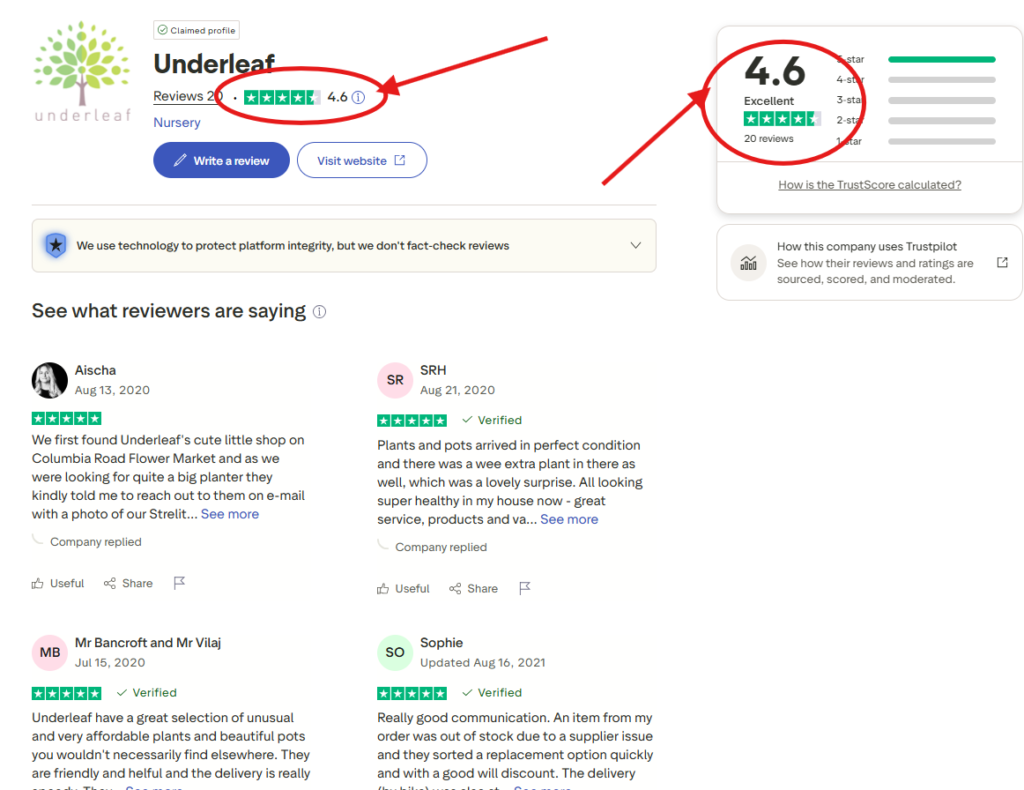
Based on the Trustpilot screenshot, Underleaf AI holds a strong rating of around 4.6 out of 5, categorized as “Excellent” with roughly 20 reviews. This indicates a high level of user satisfaction, with most ratings falling in the 4-star and 5-star range. Such a score suggests that users find the platform reliable, useful, and effective for tasks like AI writing, LaTeX conversion, and academic content creation.
Although the total number of reviews is still limited, the overall sentiment is clearly positive, highlighting good user experience and performance. This makes Underleaf AI a promising tool for students and researchers looking for AI-powered writing support. If you want to try it yourself, you can get started with Underleaf AI here and use code “ARCH30” to access exclusive benefits.
Underleaf AI Review 2026 – Chrome Extension Rating Analysis
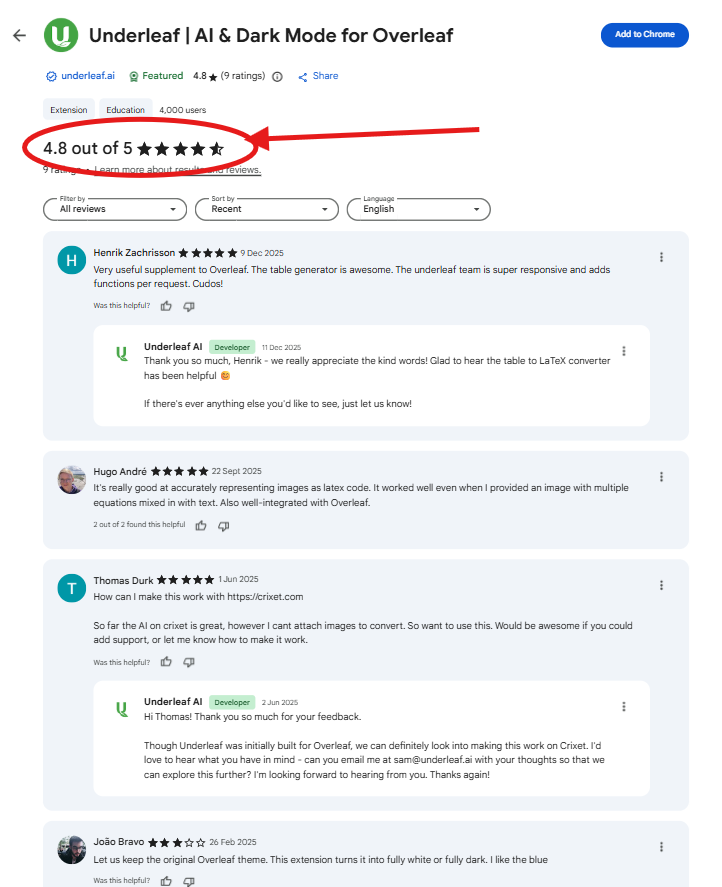
Based on the Chrome Web Store screenshot, Underleaf AI’s extension holds an impressive 4.8 out of 5 rating from around 9 users, which highlights very strong early user satisfaction. This high score suggests that users find the extension highly effective for improving their workflow inside Overleaf, especially for tasks like AI writing, LaTeX conversion, and academic editing. Additionally, the tool is designed specifically for researchers and integrates directly into Overleaf, making it more convenient than standalone AI tools.
User feedback in the screenshot also points toward practical benefits like accurate LaTeX conversion, strong integration, and responsive updates, which are key strengths of the platform. While the number of reviews is still limited, the near-perfect rating indicates that early adopters are highly satisfied with performance and usability. If you want to try it yourself, you can get started with Underleaf AI here and use code “ARCH30” to unlock exclusive benefits.
Underleaf AI Review 2026 – TenereTeam Rating Analysis
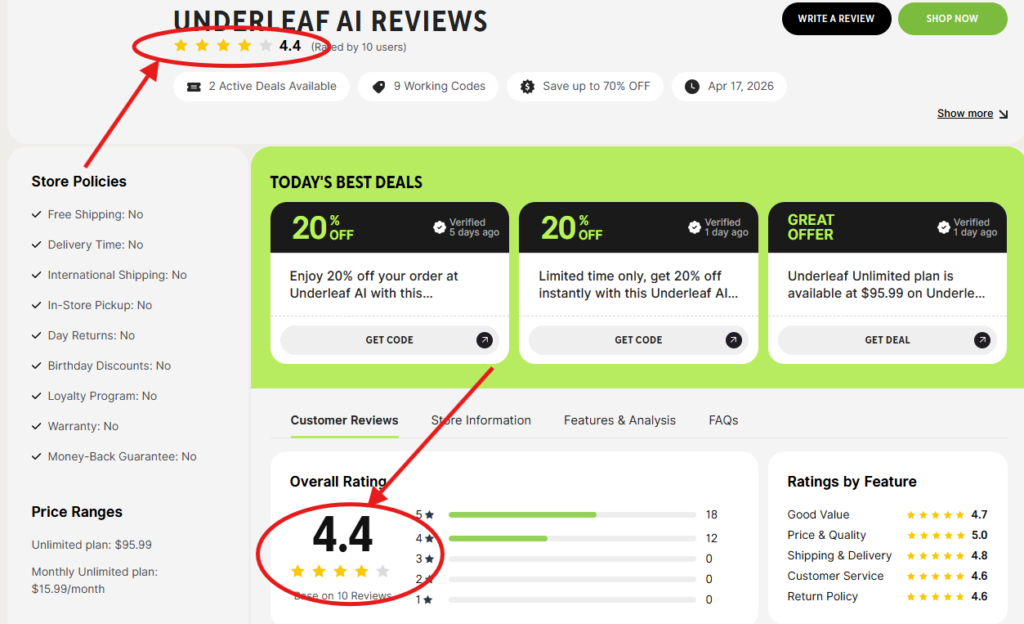
Based on the TenereTeam screenshot, Underleaf AI holds an overall rating of around 4.4/5 from 10 user reviews, indicating a solid and positive user experience. The platform performs particularly well in key areas such as price & quality (5.0), value for money (4.7), and delivery (4.8), showing that users find it reliable, efficient, and worth its cost. These ratings support Underleaf AI’s reputation as a useful tool for academic writing, LaTeX conversion, and AI-powered content creation.
Although the total number of reviews is still limited, the overall sentiment is clearly positive, making it a promising option for students, researchers, and professionals. If you want to try it yourself, you can get started with Underleaf AI here and use code “ARCH30” to unlock exclusive discounts.
How to Use Underleaf AI Promo Code (ARCH30) tò Get 20% Off On Subscription Plan ( Step-by-Step Guide )

Step 1: Visit the official Underleaf AI website using this link: Sign up on Underleaf AI and click on “Get Started”.
Step 2: Create your account by entering your details and logging in to the dashboard.
Step 3: On the left side, click on the “Upgrade Now” option to view available subscription plans.
Step 4: Choose a plan based on your needs (monthly or annual). The annual plan usually offers better savings.
Step 5: During checkout, locate the promo code section and enter the code “ARCH30”.
Step 6: Click on Apply to activate the discount, and you’ll instantly receive up to 20% OFF on your subscription.
Step 7: Complete your payment, and you’re ready to start using Underleaf AI with discounted pricing.
Note: Pricing and discounts may change over time depending on offers and plans, so make sure to verify the final price on the checkout page before completing your purchase.
Underleaf AI Pricing Plans (2026)
Underleaf AI offers a freemium + paid subscription model designed for students, researchers, and professionals. You can start with a free plan (limited access), and then upgrade to paid plans based on your usage and needs.
Free vs Paid Plans
The free version gives basic access to AI tools, but with limited credits and features. Paid plans unlock higher usage limits, faster processing, and full access to all LaTeX and AI writing tools.
Credit-Based System Explained
Underleaf AI uses a credit-based system, where each action (like converting images, PDFs, or generating content) consumes credits. The more advanced your usage, the more credits you need—making higher plans more suitable for heavy users.
Plans Comparison (Essentials, Pro, Team)
Essentials Plan – Around $4.99/month with ~200 credits, suitable for beginners and students.
Pro Plan – Around $9.99/month with ~500 credits, includes all features and priority support.
Team Plan – Designed for research groups and institutions, offering shared access, admin tools, and higher credit limits.
These plans are affordable compared to traditional academic tools, and you can further reduce costs using an Underleaf AI promo code, Underleaf AI discount code, or Underleaf AI coupon code.
Many users take advantage of the “ARCH30” code, which can provide up to ~20% discount on subscriptions, making premium plans even more budget-friendly.
Underleaf AI Pros and Cons
✅ Pros
Fast LaTeX Conversion: AI-powered tools can quickly convert text, PDFs, or handwritten notes into LaTeX, saving hours of manual work.
Academic-Focused AI: Designed specifically for research and technical writing, similar to how modern LaTeX tools use AI to improve writing quality and efficiency.
Saves Time: Automation features like content generation, formatting, and summarization significantly speed up document creation.
Easy Integration: Works smoothly with platforms like Overleaf, which are already known for simplifying LaTeX workflows and collaboration.
❌ Cons
Credit Limits: Like many AI tools, usage may be restricted by daily or monthly limits unless you upgrade, which can slow down heavy users.
Not Useful for Non-LaTeX Users: If you don’t work with LaTeX, the tool offers limited value compared to general writing tools.
New Platform (Limited Trust Signals): Unlike established tools, newer AI platforms may lack strong user reviews, long-term reliability data, or community trust.
Underleaf AI Review 2026 – Real User Reviews & Feedback
When analyzing Underleaf AI reviews, the overall feedback across platforms is generally positive but still limited due to the tool being relatively new.
From TenereTeam, Underleaf AI holds an average rating of around 4.4/5 based on early users, with most reviewers highlighting its usefulness for LaTeX writing, AI-powered editing, and time-saving features. Many users appreciate its seamless integration with Overleaf and features like citation support and image-to-LaTeX conversion, which significantly improve productivity.
On platforms like Trustpilot, there is limited or unclear data specifically for Underleaf AI, so it’s important to verify reviews carefully and not rely on a single source. This is common for newer AI tools that haven’t yet built a large public review base.
Looking at Underleaf Reddit discussions, feedback is more mixed and realistic. Some users find the tool “very useful” for speeding up academic writing and converting notes into LaTeX, especially for research and thesis work. However, others are more skeptical, with comments suggesting it may feel like “just another AI wrapper” or questioning whether similar results can be achieved using general AI tools.
Overall, the sentiment is:
Positive: Strong for productivity, LaTeX automation, and academic use
Neutral to Mixed: Concerns about originality, necessity, and long-term reliability
Limitation: Fewer verified reviews compared to established platforms
This suggests that while Underleaf AI shows strong potential, users should test it themselves and not rely solely on early reviews.
Underleaf vs Overleaf (Comparison Section)
When comparing Underleaf vs Overleaf, both tools serve LaTeX users but take very different approaches—one focuses on AI-powered automation, while the other is a traditional, collaboration-focused LaTeX editor.
Feature Comparison
Underleaf AI offers advanced features like image-to-LaTeX conversion, PDF conversion, and AI-assisted writing directly inside the editor. It can also integrate into Overleaf via a Chrome extension, adding AI capabilities on top of the existing workflow.
Overleaf, on the other hand, is a cloud-based LaTeX editor known for real-time collaboration, templates, and publishing support, widely used in academia.
AI Capabilities
This is where the biggest difference lies. Underleaf is built as an AI-first tool, offering writing suggestions, citation help, and automated LaTeX generation.
Overleaf has limited native AI features and mainly relies on manual editing, although it can be enhanced using tools like Underleaf itself.
Ease of Use
Underleaf is easier for beginners because it reduces the need to manually write LaTeX code—AI handles much of the complexity.
Overleaf, while user-friendly for experienced users, still requires knowledge of LaTeX syntax, making it slightly harder for beginners but powerful for advanced users.
Pricing
Underleaf offers a free plan with credits and affordable paid plans starting around $4.99/month.
Overleaf also has a free plan, but its premium plans are more expensive (around $21/month and above) and mainly focus on collaboration features rather than AI tools.
Is Underleaf AI Safe & Legit?
When evaluating whether Underleaf AI is safe and legitimate, it’s important to look at data privacy, browser extension safety, and overall transparency.
Data & Privacy Concerns
Underleaf AI states that it only collects limited usage data (such as how features are used) to improve its services and does not sell user data to third parties.
Additionally, the platform claims that user-submitted content is processed only when you actively use the tool and is not stored permanently. This is a positive sign, especially for academic users working with sensitive research documents.
Browser Extension Safety
Since Underleaf works as a Chrome extension for Overleaf, users often worry about security. According to its documentation, the extension:
Uses encrypted connections for data transfer
Does not access your Overleaf account credentials
Only processes content that you manually input
However, like any browser extension, it’s still recommended to install it only from official sources and review permissions before use.
Transparency & Legitimacy
Underleaf AI appears to be a legitimate but relatively new platform. It provides:
Public privacy policy and documentation
Clear explanation of how credits, features, and tools work
Integration with known platforms like Overleaf
It is also reportedly used by thousands of academics and institutions, which adds some level of credibility, though it still lacks the long-term reputation of more established tools.
Who Should Use Underleaf AI?
Underleaf AI is designed for a specific group of users who regularly work with LaTeX and academic content, rather than general writing tasks.
Students
Students, especially those in STEM fields, can benefit the most from Underleaf AI. It helps convert handwritten notes and assignments into LaTeX quickly and improves academic writing with AI suggestions. The platform is widely used by students for thesis writing and research documentation.
Researchers
Researchers and PhD scholars can use Underleaf AI to speed up paper writing, manage citations, and convert PDFs into editable LaTeX. Its tools are specifically built for academic workflows, helping save time on formatting and editing.
Engineers & Technical Professionals
Engineers and professionals who frequently write technical documents, reports, or mathematical content will find it highly useful. Features like equation generation and image-to-LaTeX conversion make it ideal for technical documentation.
Professors & Academic Teams
It is also useful for professors and research teams who create lecture notes, assignments, or collaborative research papers, especially with its integration into Overleaf workflows.
Not Ideal for General Writers
Underleaf AI is not designed for casual or general content writing. If you don’t use LaTeX or academic formatting, many of its core features won’t be useful, making it less suitable compared to general AI writing tools.
Underleaf AI Review 2026 Free vs Paid
In this Underleaf AI review 2026 free vs paid comparison, the platform follows a freemium model where you can try basic features for free and upgrade for full access.
What You Get in Free Version
The free version allows users to explore core features like AI-assisted LaTeX writing, basic conversions, and limited access to tools. It’s useful for testing the platform and understanding how the AI works before committing to a paid plan. Similar to other tools, free usage typically comes with restricted credits or limited daily usage, which means you can only perform a certain number of actions.
Limitations of Free Plan
The biggest limitation is the credit-based restriction, which can quickly run out if you are working on large documents or multiple conversions. Advanced features, higher limits, and faster processing are locked behind paid plans. This is similar to other LaTeX AI tools where free access is mainly for light usage or testing.
Is Paid Version Worth It?
The paid plans (like Essentials and Pro) offer more credits, full access to all features, and better performance, making them suitable for regular users such as students and researchers. For example, paid plans include hundreds of credits per month and full AI tool access, which significantly improves productivity.
If you frequently work with LaTeX, research papers, or technical documents, upgrading is generally worth it. You can also reduce the cost using an Underleaf AI promo code, Underleaf AI discount code, or Underleaf AI coupon code like “ARCH30”, which may offer additional savings on subscriptions.
Alternatives to Underleaf AI
If you’re exploring options beyond Underleaf, there are several strong alternatives depending on whether you need AI writing, LaTeX editing, or full research assistance.
Overleaf (Best Traditional LaTeX Editor)
Overleaf is one of the most popular LaTeX platforms, widely used in academia for its real-time collaboration, templates, and publishing support. While it has recently introduced some AI features, they are limited or require a paid add-on for full access.
Best for: Collaboration, journal submissions, team projects
Limitation: Less AI automation compared to Underleaf
ChatGPT (Best AI Writing Assistant)
ChatGPT is a powerful AI tool that can help generate LaTeX code, explain equations, summarize research papers, and improve writing. It’s not a dedicated LaTeX editor but works well alongside tools like Overleaf. Many researchers use it for drafting and idea generation. Best for: AI writing, idea generation, explanations
Limitation: No built-in LaTeX editor or real-time preview
Other LaTeX Tools (AI + Non-AI Options)
1. Octree (AI LaTeX Editor)
An AI-powered LaTeX editor offering features like automatic error fixing, templates, and fast compilation—often positioned as a free alternative to paid tools.
2. Crixet (AI-Enhanced Editor)
A modern LaTeX editor with built-in AI assistance, code generation, and workflow automation for academic writing.
3. Murfy AI (Collaboration + AI)
An AI-powered LaTeX platform focused on faster writing, real-time collaboration, and automatic error fixing.
4. TeXstudio (Free Desktop Option)
A fully offline, open-source LaTeX editor with powerful customization—ideal for users who prefer local setups without AI features.
5. Prism (AI-Native LaTeX Workspace)
A newer AI-first LaTeX workspace that integrates advanced AI directly into the editor for writing, editing, and collaboration.
Bonus Section – Extra Insights for Users
Underleaf AI Review 2026 PDF (Downloadable Summary Idea)
If you prefer a quick overview, you can create or access an “Underleaf AI review 2026 PDF” as a downloadable summary of this article. This can include key points like features, pricing, pros/cons, and final verdict in a compact format. It’s especially useful for students and researchers who want an offline reference or need to share insights with peers. Currently, there is no official PDF provided by Underleaf, but many users create their own summaries for convenience.
Underleaf AI GitHub (Availability Check)
When searching for “Underleaf AI review 2026 GitHub”, there is no official public GitHub repository clearly associated with Underleaf AI at the moment. This suggests that the platform is likely closed-source, meaning its core technology and code are not publicly available.
For users, this means:
You rely on the official platform rather than self-hosted versions
Limited transparency compared to open-source tools
No direct community contributions via GitHub
Final Verdict – Underleaf AI Review 2026
In this Underleaf AI Review 2026, the platform stands out as a powerful AI-driven tool for LaTeX users, offering features like automated writing, fast conversions, and academic-focused assistance. It significantly reduces the time required to create technical documents, making it a strong option for modern researchers and students. However, its credit-based system and relatively new presence in the market mean it may not yet match the trust and maturity of established platforms.
Underleaf AI is best suited for students, researchers, engineers, and academic professionals who regularly work with LaTeX and want to speed up their workflow using AI. It may not be ideal for general writers or users who don’t need LaTeX-based tools.
Overall Rating: 8/10
A highly useful and promising tool for academic writing, especially if you value speed and automation, but still evolving in terms of trust and long-term reliability.
If you’re exploring more AI productivity tools, don’t miss our detailed breakdown of Scripe AI Review 2026: Complete Breakdown of Features, Pricing, Real User Experience & Performance
Underleaf AI (Frequently Asked Questions)
1. What is Underleaf AI used for?
Underleaf AI is used to simplify LaTeX writing by using AI to generate, edit, and convert academic content. It helps students and researchers create documents faster, convert PDFs or handwritten notes into LaTeX, and improve writing quality.
2. Is Underleaf AI free?
Yes, Underleaf AI offers a free plan with limited credits. You can test core features, but for full access and higher usage limits, you’ll need to upgrade to a paid plan.
3. Is Underleaf AI safe to use?
Underleaf AI appears generally safe, as it uses secure connections and processes data only when needed. However, since it’s a newer platform, it’s recommended to avoid uploading highly sensitive or confidential documents.
4. Does Underleaf AI work with Overleaf?
Yes, Underleaf AI works with Overleaf through its Chrome extension, allowing you to add AI features and dark mode directly into your existing Overleaf workflow.
5. Underleaf vs Overleaf – which is better?
In the Underleaf vs Overleaf comparison, Underleaf is better for AI-powered automation and faster writing, while Overleaf is better for collaboration and traditional LaTeX editing. Many users combine both for the best experience.
6. Is there any Underleaf AI promo code?
Yes, you can use the Underleaf AI promo code “ARCH30” to get a discount on paid plans. You can claim it here: Get Underleaf AI Discount (Use Code “ARCH30”).
7. Where can I find real Underleaf AI reviews?
You can find Underleaf AI reviews on platforms like TenereTeam, Reddit discussions, and other review sites. Since it’s a new tool, reviews are still growing but generally positive.
8. Can Underleaf AI convert handwritten notes to LaTeX?
Yes, one of its key features is converting handwritten notes or images into structured LaTeX, which saves a lot of manual typing time for students and researchers.
9. Is Underleaf AI worth it in 2026?
Based on this Underleaf AI review 2026, it is worth it for regular LaTeX users, especially students and researchers who want to save time using AI-powered automation.
10. Does Underleaf AI have a GitHub repository?
Currently, there is no official public GitHub repository for Underleaf AI, which means it is likely a closed-source platform.
Related Articles

Revid AI Review 2026: Complete Guide to Features, Pricing & Performance
Our featured posts highlight the best deals available today.

RS Chrono Review 2026: Honest Pros, Cons, Pricing, Real Experience & Real Customer Ratings
Our featured posts highlight the best deals available today.

Klap Review 2026 – Full Analysis of Features, Pricing, Use Cases & Real User Experiences
Our featured posts highlight the best deals available today.

Bonds and Mason Review 2026: Honest Pros, Cons, Pricing, Real Experience & Real Customer Ratings
Our featured posts highlight the best deals available today.

Dumpling AI Review 2026 – Features, Pricing, Pros, Cons & Real User Experience Explained
Our featured posts highlight the best deals available today.

SmartScout Review 2026: Features, Pricing, Accuracy & Performance Explained
Our featured posts highlight the best deals available today.